Treasury teams are under constant pressure to answer new questions from CFOs, fast. The challenge is that traditional systems generally aren’t built for the pace or the specificity of those requests. When priorities change, dashboards become stale, and building new reports can take days.
That dynamic is starting to change.
Recently, Trovata Sales Engineer Chris Brown demonstrated how you can use Trovata AI to generate a key metric: Days Cash on Hand (DCOH). The turnaround? Minutes. No SQL. No custom reporting. No development queue. This is a small but meaningful example of what becomes possible when treasury teams are AI-ready—working with clean, real-time bank data and natural-language interfaces to generate metrics on demand. It’s not a distant vision of “agentic AI,” but a practical step toward it, available today.
Below, we’ll break down exactly how you can develop any prompt to generate your team's own most-requested metrics.
Watch the short video for a quick overview, or keep reading to dive deeper.
The Metric in Question
The treasury analyst and prospective Trovata user needed a fast, accurate view of DCOH, a fundamental liquidity metric for companies burning cash or scaling aggressively. They wanted to communicate it to the CFO daily, which is not always easy for fast-scaling businesses or those with complex banking and transaction data.
In many systems, answering that question requires building a custom report or dashboard that pulls balances from multiple accounts, normalizes the data, applies burn-rate assumptions, and calculates the runway. That means meetings, configuration work, validation, and, often, consultants.
Trovata AI offered a simpler way. Here's how:
Step 1: Build the Prompt, Not the Dashboard
The first thing Chris did to come up with the DCOH metric was draft an initial prompt or natural-language instruction for Trovata AI:
“Pull my balances, take the total cash available today, and divide it by my daily burn rate. Return the result as days cash on hand.”
Here is the result:
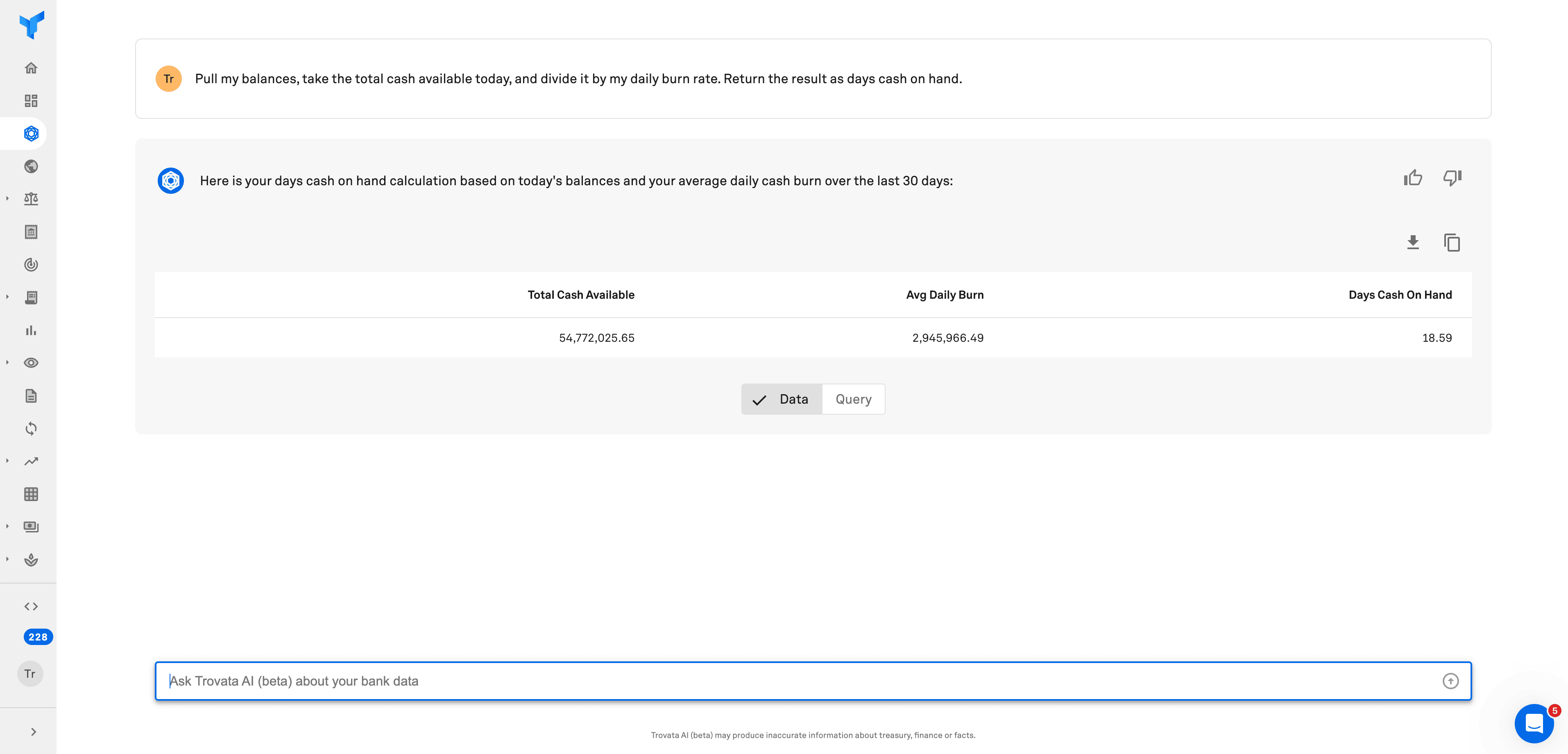
Because Trovata is already aggregating real-time balances and transactions via direct APIs, Trovata AI was able to retrieve the numbers instantly. Then, it performed the calculation and surfaced the result in plain English.
What’s important to note is that he didn’t need to prebuild a data model. The data already existed—structured and normalized in Trovata’s bank data lake. The example shown here uses a demo account, but the workflow is the same in a live customer environment. The AI layer simply translated that underlying data into the specific metric the prospect needed.
This is exactly what we mean when we reference ‘clean, accessible, real-time data’ as a prerequisite for AI success in treasury. If the underlying data was brought in through manual, error-prone workflows or contained outdated information, the AI’s response would've had no chance of providing an accurate answer.
Step 2: Use AI to Optimize the Prompt
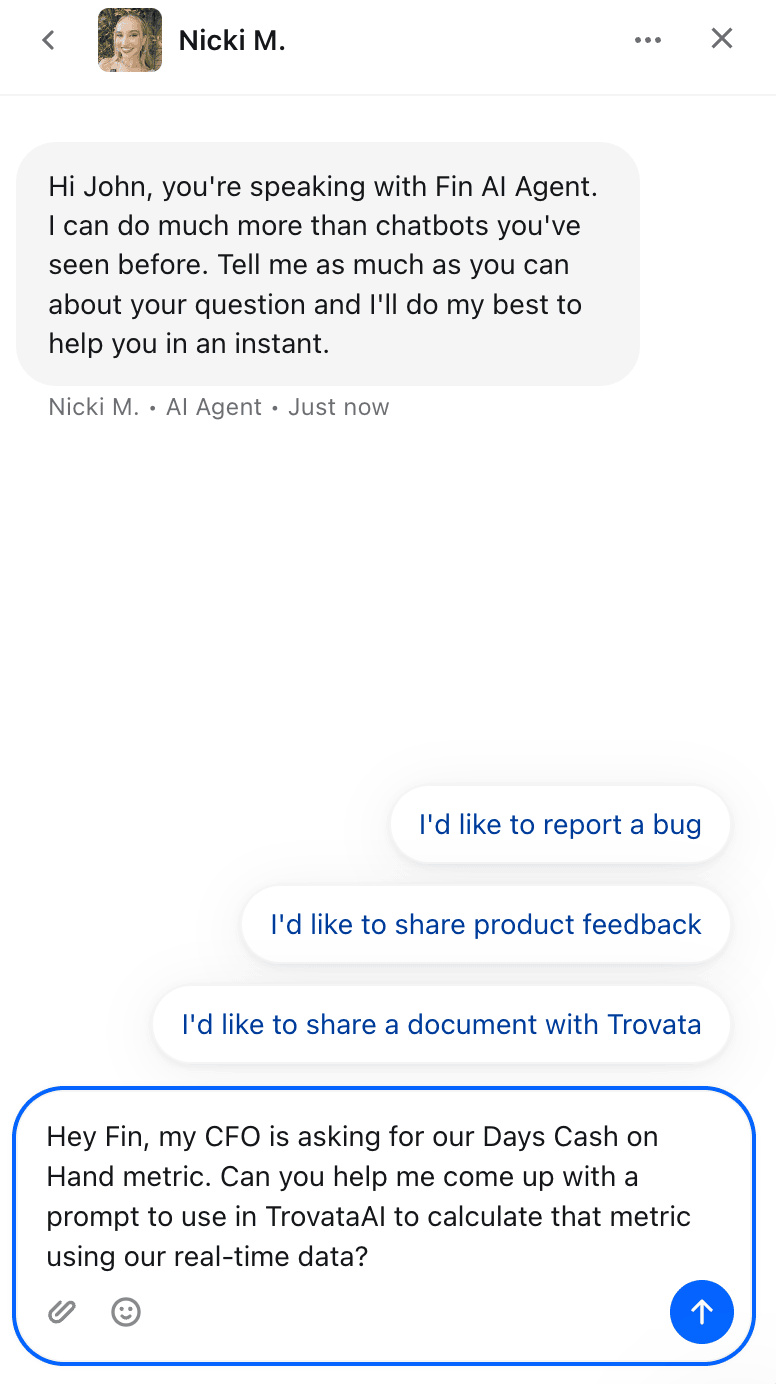
Chris could have stopped there, as the metric had been calculated. But he wanted to see how he could further improve upon this process. Specifically, he wanted to use a more concise and repeatable version of the prompt.
He opened Fin, Intercom’s AI assistant, which is synced with Trovata’s product documentation in the Help Center. Fin understands both the business context (how to calculate DCOH) and the technical context (how Trovata AI expects a prompt to be structured). It helped refine the phrasing into a more straightforward and repeatable prompt:
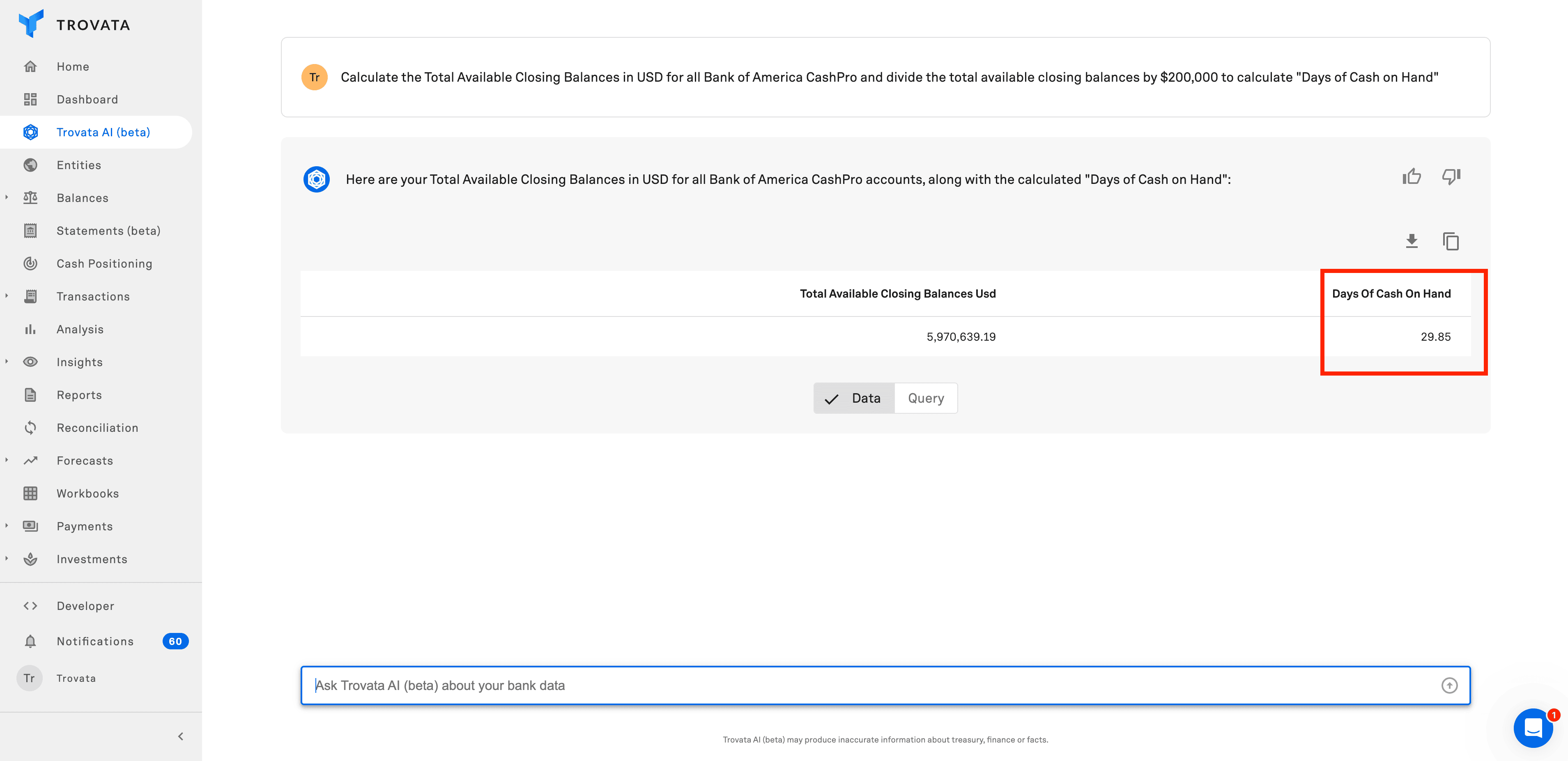
💡This is where AI becomes a force multiplier. You don’t just use AI to get a result. You use AI to help create the prompt that gets the result.
Step 3: Validate Before You Trust
To verify that the output was accurate, Chris did a little bit of fact-checking by:
Checking total cash on the Balances page in Trovata
Drilling into account-level metadata
Verifying the math manually
After completing this verification, he found the AI response accurate and the prompt well written.
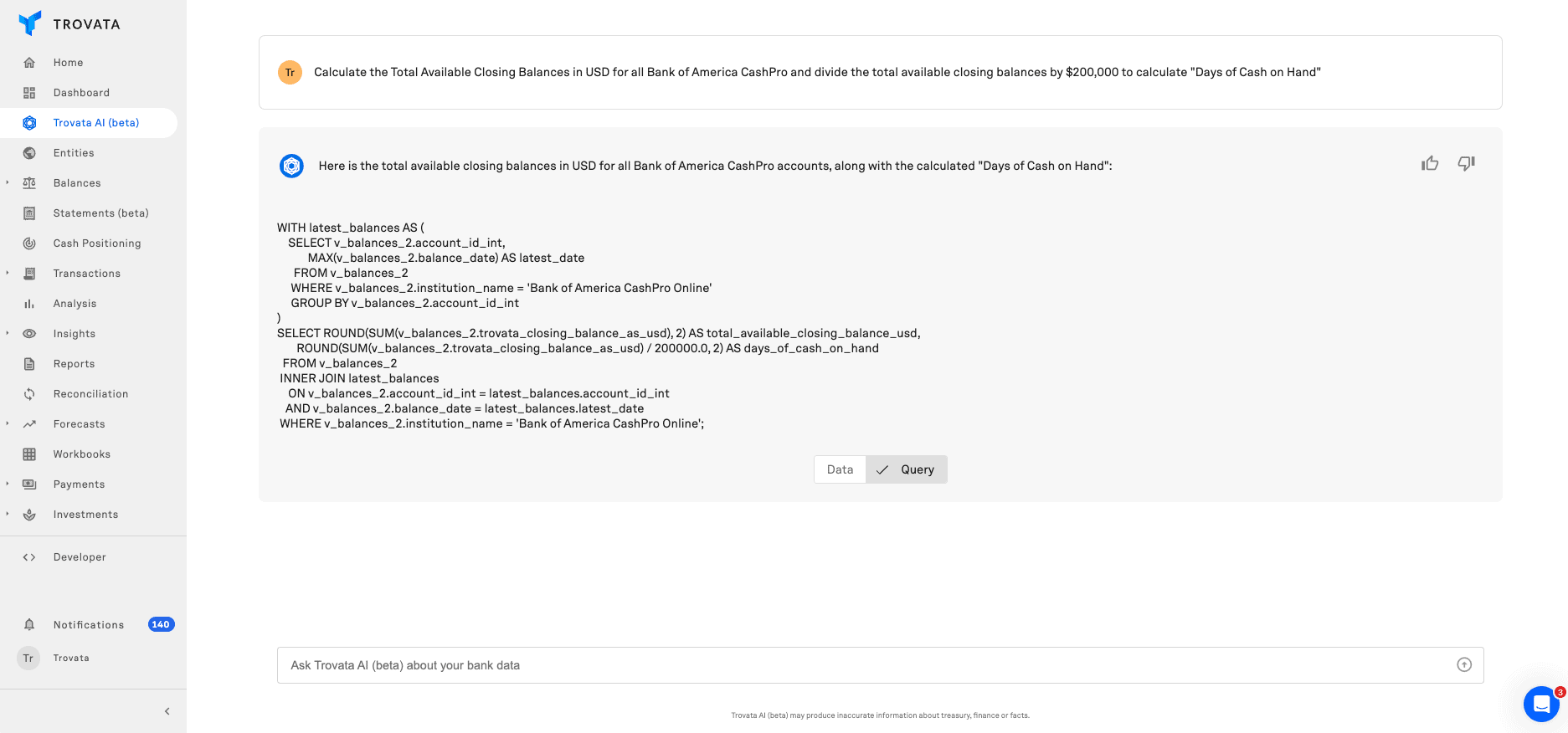
Bonus Tip: Trovata AI enables you to view the actual database query it uses for any given prompt to generate its output, offering full transparency for technically-minded users. We always say that 'explainability' is one of the key questions that treasury teams should ask any AI vendor.
Step 4: Repeat as Needed
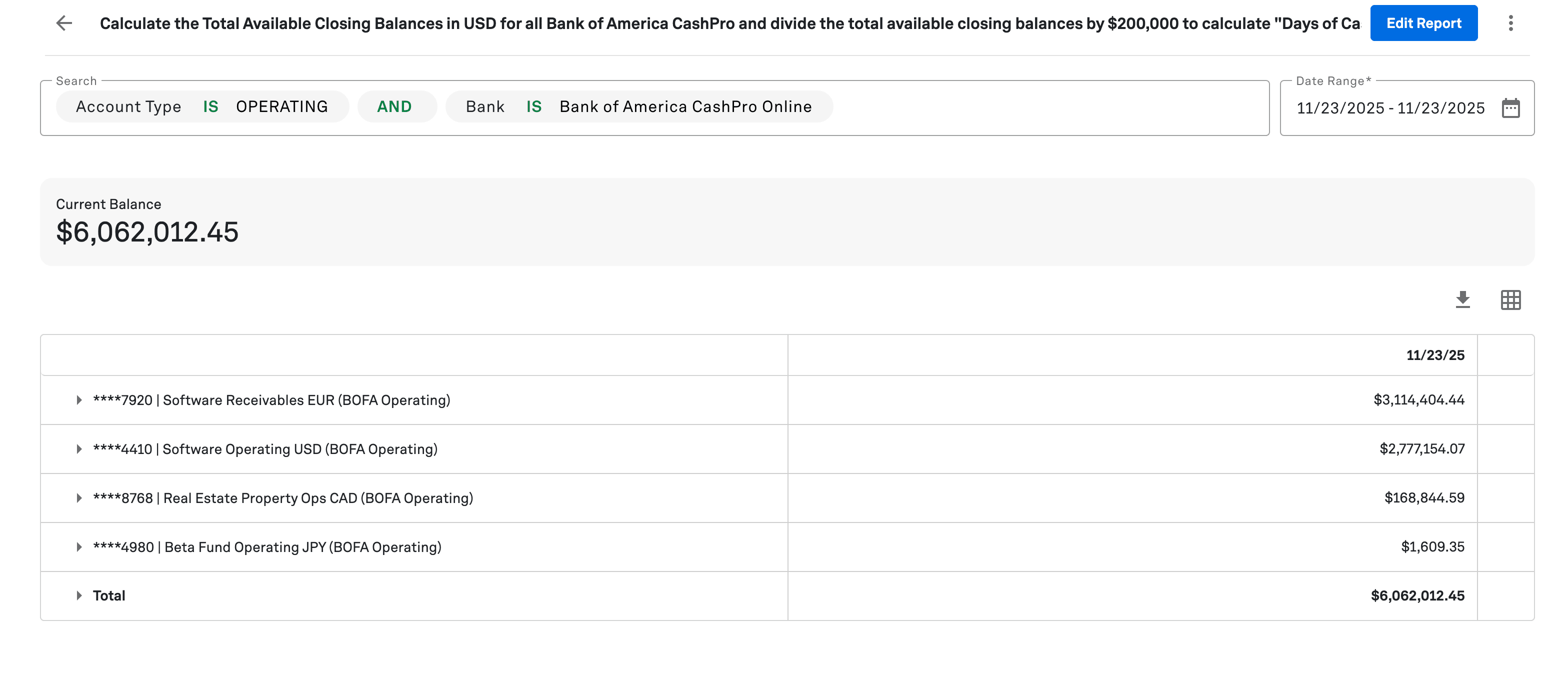
In order to demonstrate to the prospective client how they could easily re-run this prompt, Chris placed the prompt text directly in a dashboard report title. That allowed him to:
Store the prompt in context
Validate the underlying balances visually
Copy and paste the prompt into Trovata AI whenever needed
What would have required a custom metric or a scoped dashboard in a legacy tool is now a lightweight workflow anyone can reproduce.
Why This Matters for Treasury Teams
This example isn’t just about calculating DCOH. It’s about a new way of working, where treasury professionals generate bespoke metrics themselves, in minutes, without waiting for a dashboard or relying on IT.
This story highlights four shifts:
1. Prompts are Becoming More Flexible Than Dashboards
Dashboards are powerful, but they’re rigid. AI prompts adapt instantly to new priorities. If a CFO wants to monitor a new metric tomorrow, the analyst can draft a prompt on the spot.
2. AI Bridges the Last Mile Between Systems and Insight
Treasury data is rich. With the right data lake in place, it can also be easily categorized, tagged and searched. The bottleneck has always been turning that data into answers, but AI can now close that gap.
3. Validation Remains a Human Responsibility
AI acceleration doesn’t eliminate risk controls. It strengthens them by giving analysts more tools to confirm accuracy. This isn’t (and never will be) about giving AI the keys and letting it run your business, but it is about giving your real talent the time and bandwidth to use their expertise on high value work, no digging through statements and manually calculating spreadsheets.
4. This is a Preview of Agentic AI
Today, the user triggers the calculation. In tomorrow’s system, the prompt runs automatically, checks ranges, and alerts the user if the result deviates. This is exactly the direction outlined in the AI readiness framework we shared with Strategic Treasurer.
The Bigger Picture: AI-Ready Treasury Teams Move Faster
Most CFOs operate in environments where priorities can shift quickly and with little warning. Funding changes runway. M&A creates new reporting needs. Interest-rate moves drive daily questions about exposure.
The traditional model of building static reports for each new question can’t keep up.
AI-enabled treasury teams operate differently:
They start with live, API-fed data
They generate metrics in natural language
They validate quickly
They adapt prompts as the business changes
It’s a lightweight, analyst-led model that reduces reliance on BI teams, reduces friction, and expands the number of questions treasury can answer in real time.
What Comes Next
The DCOH example is one of many metrics that can be produced on demand when AI sits on top of clean, real-time data. Any calculation that blends multiple inputs is a strong candidate for prompt-based analysis.
What’s changing is who can create those insights. You no longer need a dashboard build, a modeling exercise, or a backlog request to answer a CFO’s follow-up question. Analysts can generate precise, situational metrics themselves, validate them quickly, and adapt the prompt as conditions shift.
If you want to learn more about how this could work with your own data, and what types of metrics your team could generate instantly, book a Trovata demo.
See Trovata AI in action:

Jason Mountford
Finance Professional
A finance professional with over 15 years in wealth management, Jason started Hedge, a content agency, to bridge the gap between great writers and great finance businesses. He is a fully qualified Financial Advisor in both the UK and Australia, and also works with many clients in the United States and the Gulf Cooperation Council. He’s worked with companies of all sizes, from the Fortune 500 to small boutique firms. As a financial commentator, Jason has appeared in FT Adviser, Bloomberg, Investors Chronicle, the Daily Mail, the Daily Express, Money Marketing and more. Outside of work, Jason enjoys spending time with his wife and 2 kids, and keeping active. He’s a keen (though slow) endurance athlete, enjoying running, cycling and triathlon.
Subscribe to our newsletter
In this blog post
Explore with AI
Subscribe to our newsletter
Other resources
View all in AI & ML